e-Invoice Middleware Malaysia – MyInvois API Integration
Connect your POS, ERP, accounting software and business systems to LHDN MyInvois without rebuilding your existing billing system.
Reduce development time and avoid maintaining separate MyInvois integrations for every application.
API Documentation

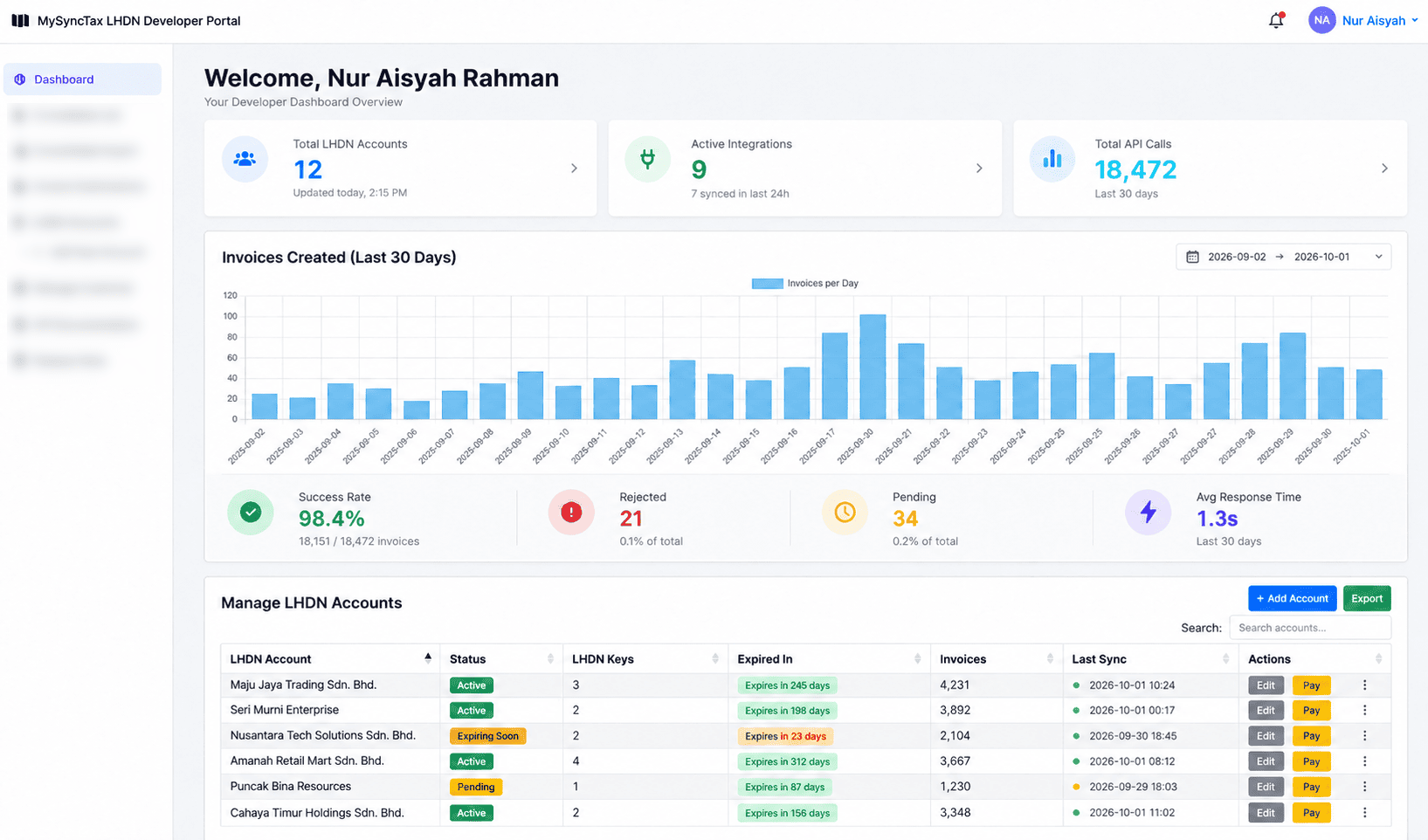
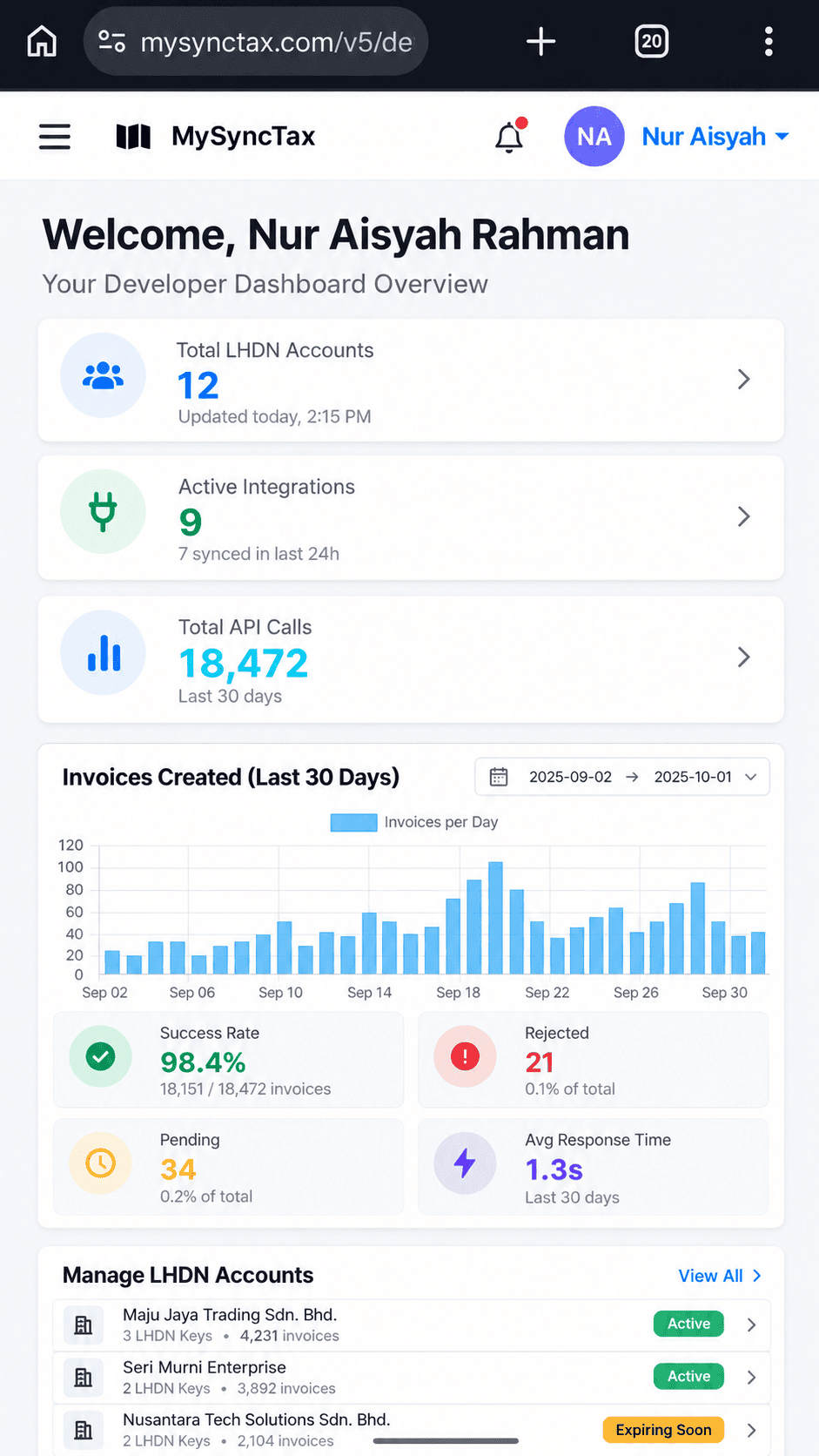
One Middleware Layer for Multiple POS, ERP and Business Applications
Running more than one business system? Connect them to LHDN MyInvois through MySyncTax. Your POS, ERP, accounting and custom applications can share one e-Invoice integration layer while each system continues to handle the work it was built for.
Your Software
POS, ERP, accounting or e-commerce
MySyncTax
e-Invoice middleware API
LHDN MyInvois
LHDN e-Invoice platform
Building and maintaining a separate MyInvois connection for each application repeats the same work. MySyncTax gives your team a shared connection to maintain as you add or update business systems.
MySyncTax handles invoice submission and status tracking, helping your team see which invoices have been processed and which need attention. Your sales, customer records and billing stay in your existing software.
What MySyncTax Solves for Your Business
MyInvois API middleware connects your business software to LHDN MyInvois. For your business, that means keeping familiar tools, reducing repeated integration work and giving multiple applications a common way to submit e-Invoices.

Keep Your Existing Software
Connect your existing system without replacing your POS, ERP or accounting software. Your team can keep using familiar sales and billing tools while MySyncTax handles the MyInvois connection.
Reduce Development Time
Give your developers a shared middleware API to connect to. Reduce repeated development and maintenance work instead of building a separate MyInvois integration for every application.
Connect Multiple Business Applications
Use one middleware layer across your POS, ERP, accounting and custom systems. Each application keeps its own role while sharing the same approach to MyInvois submission and status tracking.
Who Needs e-Invoice Middleware?
If you need to add MyInvois support to software you sell, connect several business systems or keep your existing billing tools, e-Invoice middleware can help. MySyncTax gives these businesses a shared connection to LHDN MyInvois, reducing the need to build and maintain separate integrations.

Software Houses
Add e-Invoice capabilities to your software products or SaaS platforms. Reuse one middleware connection across applications to reduce repeated development and maintenance work.
POS Vendors
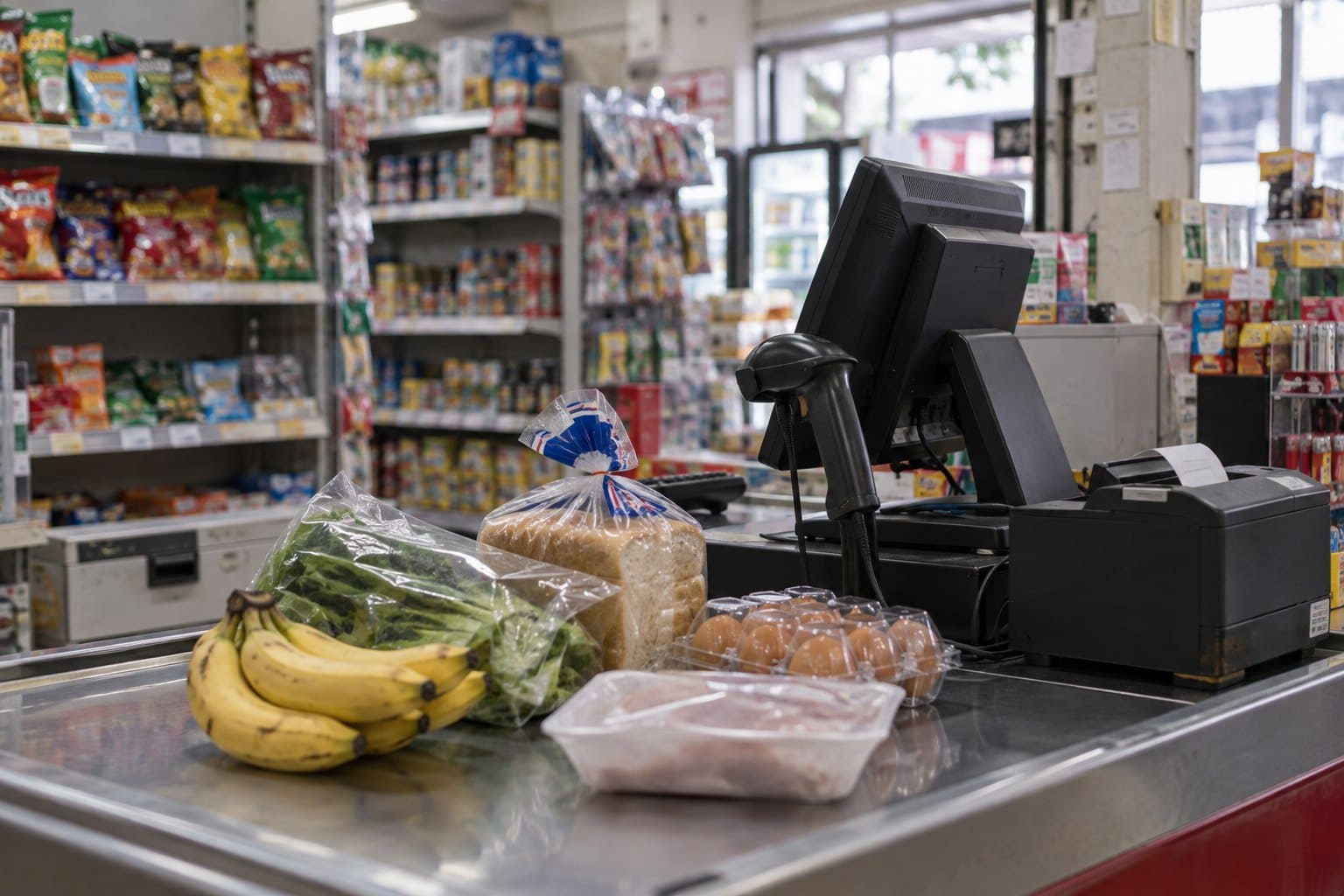
Offer MyInvois integration to retail, F&B and multi-outlet customers while keeping familiar checkout and receipt workflows in your existing POS software.

ERP Companies
Connect your customers' ERP billing processes to MyInvois while keeping inventory, purchasing and operational workflows in the ERP they already use.

Accounting Software
Let customers submit e-Invoices and track their status from familiar accounting and billing tools, without replacing their accounting software.

E-Commerce Platforms
Connect invoice data from your online sales platform to MyInvois. Keep order management and fulfilment in your existing platform while MySyncTax handles e-Invoice submission and status tracking.

Large Enterprises
Bring multiple POS, ERP and internal business applications onto one middleware layer. Reduce separate integration projects and give your teams a consistent way to manage MyInvois submissions.
How MySyncTax Fits Into Your MyInvois e-Invoice Workflow
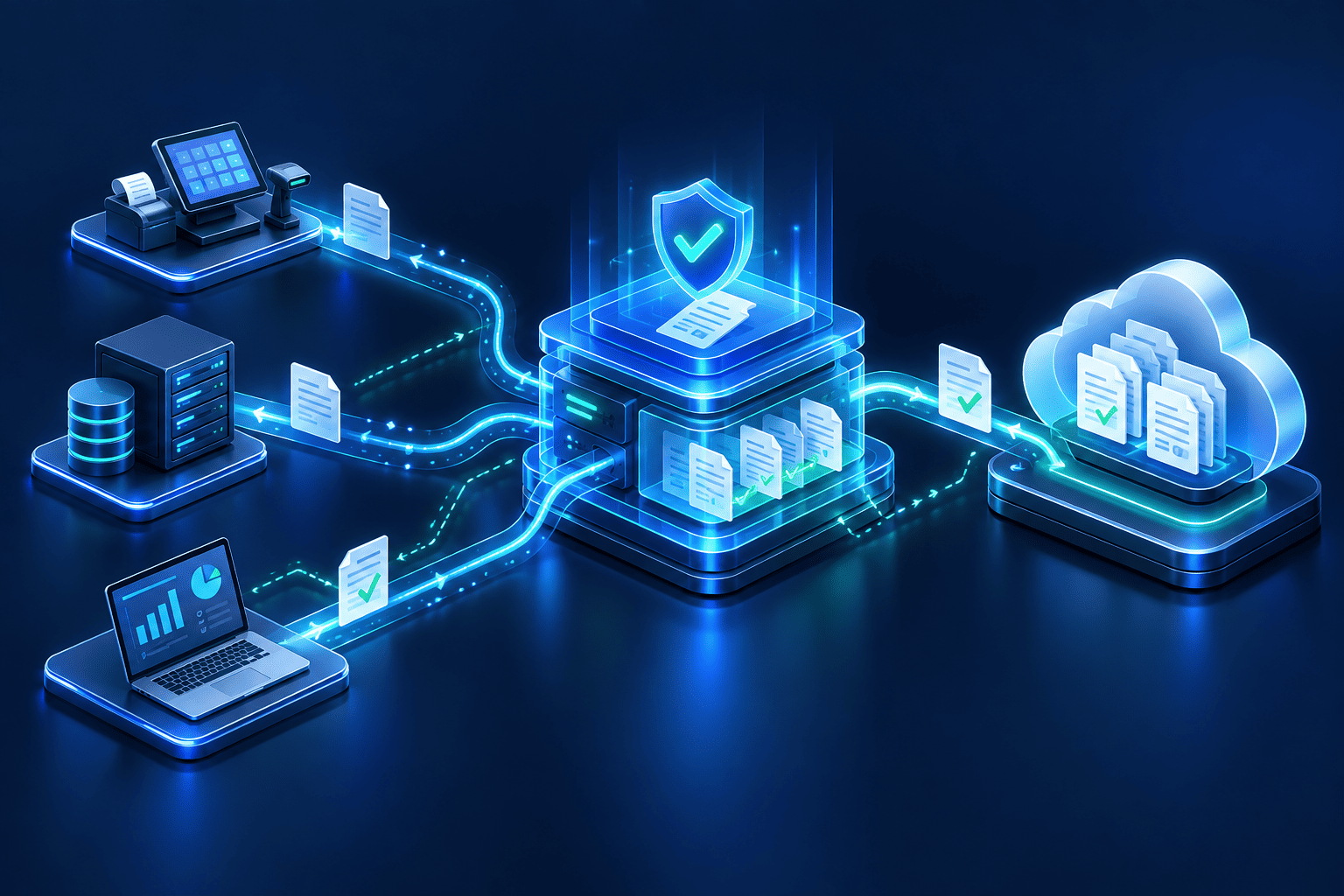
The flow is simple: your system creates the invoice, MySyncTax handles the MyInvois-facing work, and the result comes back to your application. In a typical integration, it looks like this:
Connect Your Software
- Connect your POS, ERP, accounting or e-commerce application to the documented MySyncTax API.
- The integration uses HTTPS and JSON, so your developers can work in the technology stack already used by your product.
Send Invoice Data
- When an invoice is ready, your system sends the required information to MySyncTax.
- Your developers map the fields from your application to the documented request format for the relevant document flow.
Process the Invoice Data
- MySyncTax prepares the incoming invoice data for the MyInvois submission.
- Required fields can be checked before submission so missing or invalid data can be caught earlier in the process.
Submit to MyInvois
- MySyncTax sends the prepared document to the MyInvois API.
- The MyInvois response is then returned in a form your application can use in its own workflow.
Return the Status
- Your application can receive the relevant document identifiers, submission status and processing details for each invoice.
- If webhooks are enabled for your setup, later status updates can be sent back automatically so your records stay in sync and your team can act when needed.
What the MyInvois e-Invoice Middleware Handles
Keep your application focused on the way your business already works. MySyncTax covers the common integration tasks around invoice preparation, MyInvois communication and submission follow-up. Available document flows and processing options depend on your setup.
API Integration
- Use the documented MySyncTax endpoints and request formats to connect your existing application.
- Send JSON requests from a commercial product, SaaS platform or custom in-house system.
Data Validation
- Check required invoice fields before a document is submitted.
- Flag incomplete or invalid data early so the issue can be corrected before it reaches the next step.
Data Transformation
- Convert your application's invoice data into the structure needed for the submission workflow.
- Keep MyInvois-specific processing separate from the code that runs your core business functions.
Invoice Documents
- Send invoice-related documents from your existing software through the middleware API.
- Credit note and debit note flows can also be supported, depending on the integration configuration.
Status & Logs
- Review API requests, responses and submission statuses when you need to check invoice activity.
- Use centralised logs to trace errors and investigate failed or unexpected submissions.
Queue & Retry
- Queue-based processing can help when your application sends larger batches of invoice data.
- Retry handling can reduce manual resubmission when a request fails for a temporary reason.
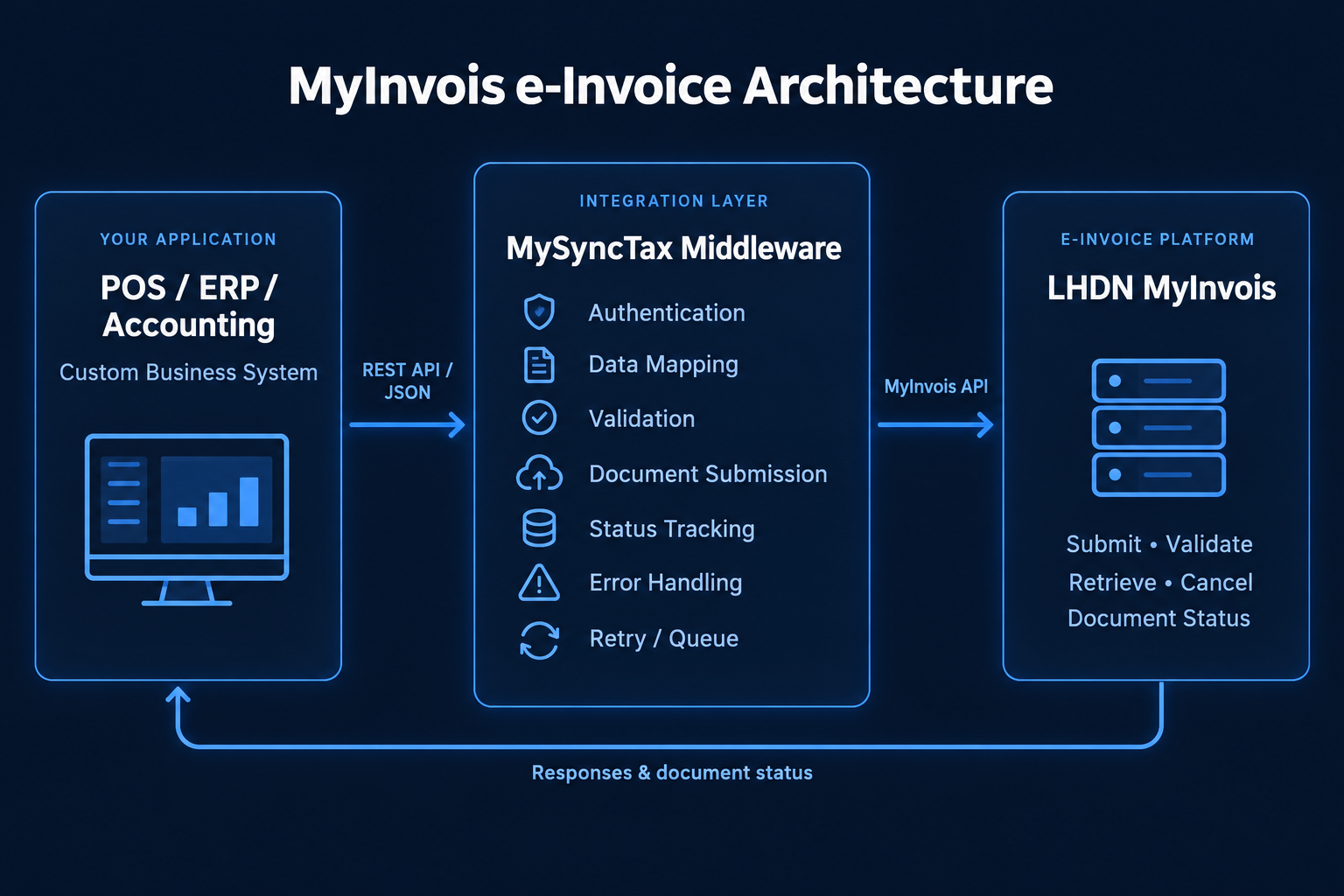
Developer Architecture: MyInvois e-Invoice Middleware
Your POS, ERP, accounting or custom business system sends invoice data to MySyncTax through a REST API using JSON. MySyncTax authenticates requests, maps and validates the data, then communicates with LHDN MyInvois. Responses and document statuses flow back through the middleware so your application can track each e-Invoice.
How Developers Integrate with MySyncTax
- Connect application to MySyncTax API
Configure your application to send HTTPS requests with JSON payloads.
- Authenticate application
Use your application's credentials following the MySyncTax API documentation.
- Map invoice/customer data
Map invoice fields, line items and customer details to the documented request format.
- Submit e-Invoice
Send the prepared document to MySyncTax for processing and submission to MyInvois.
- Receive MyInvois response
Read the response returned through MySyncTax and store the document references.
- Track validation/status
Use the returned references to follow validation and update your application's invoice record.
- Handle errors and retry
Review errors, correct invalid data and retry temporary failures through the configured retry or queue flow.
- Retrieve document details
Retrieve the document information using its reference for display and reconciliation.
When a MyInvois Middleware Layer Makes Sense
A middleware layer is useful when you want the MyInvois connection kept separate from the rest of your application. Instead of maintaining similar e-Invoice code across several products, your systems can share one integration approach. Your software still owns sales, products, customers and payments; MySyncTax takes care of the MyInvois-facing processing. The table below shows a practical split of those responsibilities.
| Your Application | MySyncTax Middleware |
|---|---|
| Manage sales | Process e-Invoice requests |
| Manage products | Validate invoice data |
| Manage customers | Transform invoice data for submission |
| Manage payments | Communicate with MyInvois |
| Run business-specific logic | Handle submission responses |
| Display invoice information | Track submission status |
| Manage customer-facing workflows | Keep integration logs |
POS e-Invoice Integration with MyInvois
Connect your point-of-sale software to LHDN MyInvois through MySyncTax e-Invoice middleware. Your POS sends the invoice information, and the middleware processes the data, submits it to MyInvois and handles the response. This gives POS providers a common way to add e-Invoice support across the retail and food-service systems they maintain.

F&B POS
Restaurant, café and food-service POS systems can keep managing orders and sales as usual, while MySyncTax handles the MyInvois submission layer.
Retail POS
Retail POS systems used by shops, minimarkets and pharmacies can send invoice information through the middleware API without moving the rest of the sales workflow out of the POS.
Multi-Outlet Systems
For multi-outlet platforms, a shared middleware service can keep the integration approach consistent across locations. The account structure should match the way those outlets or businesses are actually managed.
ERP & Accounting e-Invoice Integration
ERP and accounting platforms can use MySyncTax to connect their existing invoice and billing processes with MyInvois. The middleware handles the API communication and submission work, while business rules remain in your own software. This is useful when you want a consistent MyInvois API integration across several applications without building the full connection separately into each one.

ERP Platforms
Keep operational processes and business rules inside the ERP. Your developers only need to map the invoice data that should be sent to MySyncTax.
Accounting Software
Accounting and billing applications can send invoice data through the middleware and use the returned response to update their own records.
Custom Applications
Proprietary and in-house systems can use the same API. The integration can be built around the invoice data and processes your application already has.
MyInvois API Integration for Developers
Start with the MyInvois API Integration Guide to plan account setup, credentials and the connection to your existing system. Then use the MySyncTax API Reference for endpoints, authentication, request formats and response examples. Map your invoice data, handle errors and test status updates before moving to production.

API Documentation
- Review the endpoints, authentication and request structures your application will use.
- Use the response examples to decide how your software should store and display submission results.
- Build error handling into the integration so failed requests are visible and actionable.
View MySyncTax API Documentation
Sandbox & Production
- Use the available test environment to verify your integration before sending production invoices.
- Keep test and live credentials, endpoints and data clearly separated.
- Confirm the go-live requirements with our team before switching the connection to production.
Webhook Integration
- Use webhooks to receive configured status or processing updates in your application.
- Where supported, those updates can reduce repeated polling and help keep invoice records current.
Multiple Technology Stacks
- Integrate from PHP, Laravel, .NET, Node.js, Python or any stack that can make HTTPS requests and work with JSON.
- Reuse the same integration approach across products, while keeping each application's own invoice mapping and business rules.
Our Clients
A selection of organisations we have supported with e-Invoice integration and related software work.



MyInvois Integration FAQ
Common questions we hear from development teams and businesses planning a MyInvois e-Invoice integration.
What is MyInvois API middleware?
It is the integration layer between your business application and LHDN MyInvois. With MySyncTax, your POS, ERP, accounting or custom system sends invoice data to the middleware, which handles the MyInvois-facing processing and returns the result. Your sales and billing logic stays in your own software.
Why use MySyncTax instead of integrating directly with MyInvois?
Building a separate MyInvois connection for every application repeats development and maintenance work. MySyncTax gives your POS, ERP, accounting and business systems one middleware layer to share, so you can add e-Invoice support while keeping your existing software and billing processes.
Can MySyncTax connect to our existing POS or ERP?
Yes, provided the system can make HTTPS requests and exchange JSON data. Your developers will map the invoice fields to the MySyncTax request format and handle the returned response. If you tell us which POS or ERP you use, we can discuss the likely integration approach.
Does MySyncTax support software vendors?
Yes. MySyncTax is suitable for software vendors, POS providers, ERP developers and other technology partners that need to add MyInvois support to an existing product. The middleware keeps that connection separate from the product's own features and business rules.
Where can our developers find the API documentation?
Use the API Documentation link on this page. It covers authentication, endpoints, request formats and response examples. We recommend reviewing it alongside a sample of the invoice data your application already produces before development starts.
Can MySyncTax support multiple customers or branches?
It can, depending on how your accounts, customers and entities are structured. Share that structure with our team so the integration can be planned around the way your platform actually separates businesses or branches.
What invoice information does MySyncTax store?
Data retention depends on the service configuration and integration requirements. Before implementation, confirm with our team which invoice details and logs are retained, how they are used and how long they are kept for your setup.
Can developers test the integration before going live?
Yes, testing options are available depending on the integration configuration. Your developers can verify request formats, responses and error handling before production. Confirm the available test environment and go-live steps with our team for your setup.
Connect to MyInvois with Your Existing Software
Tell us which POS, ERP or accounting software you use and where e-Invoicing is creating extra work. We will help you assess how MySyncTax can connect your systems, reduce repeated integration work and fit into your existing operations.

💬Contact
- Chat via WhatsApp
- Email: support@mysynctax.com
- 📘 View API Documentation
📲What You’ll Receive
- An initial review of your software and e-Invoice workflow.
- Guidance on documentation, testing and integration requirements.
- Discussion of supported vendor or partner arrangements.