How to Integrate MyInvois LHDN e-Invoice
This step-by-step guide explains how to integrate MyInvois LHDN e-Invoice with a business or ERP system. It covers MyInvois intermediary registration, permissions, ERP setup, Client ID and Client Secret generation, and connecting the credentials to your e-Invoice integration platform.
MyInvois LHDN e-Invoice Integration Overview
Businesses in Malaysia that want their accounting, ERP or invoicing software to communicate with LHDN's MyInvois ecosystem need an appropriate integration setup.
The exact architecture depends on the software being used, but a system-based MyInvois integration may involve configuring representatives or intermediaries, registering the ERP system and securely configuring the credentials needed for API communication.
According to HASiL's MyInvois Portal information , MyInvois supports profile management involving taxpayers, representatives, ERP systems and intermediaries.
1 Sign in to MyTax
Begin the MyInvois LHDN e-Invoice integration process by visiting the official MyTax portal .
Sign in using the account associated with the taxpayer or business that will be connected to the MyInvois integration.
2 Open the LHDN MyInvois Portal
After signing in, open MyInvois from the MyTax portal.
In the MyInvois portal, select the profile icon and open View Taxpayer Profile. This profile contains the representative, intermediary and ERP settings used during the MyInvois integration process.
3 Add the MyInvois Intermediary
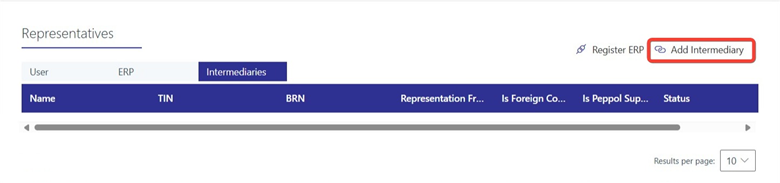
Scroll to the Representatives area and locate the Intermediaries section.
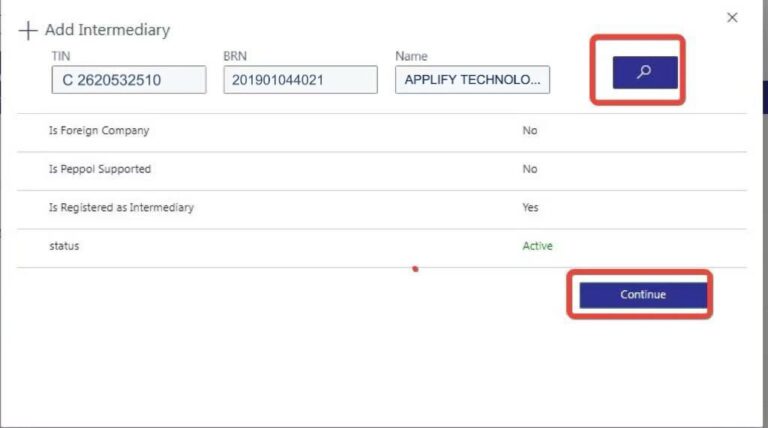
Select Add Intermediary and enter the intermediary information provided for your integration arrangement.
For this MySyncTax integration guide, the intermediary details are:
Company Name: Applify Technologies Sdn. Bhd.
BRN: 201901044021
TIN: C 2620532510
Use the search or verification control in MyInvois to verify the TIN, BRN and company name.
Once the information has been validated, select Continue.
4 Configure MyInvois Intermediary Permissions
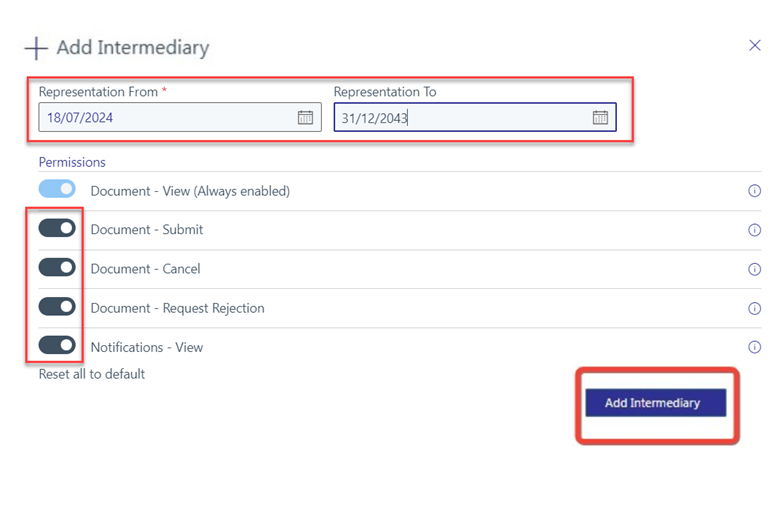
Set the Representation From and Representation To dates according to your authorised integration arrangement.
Review the permissions carefully and enable only the access required by the integration.
When the settings are correct, select Add Intermediary to complete this stage.
5 Confirm the Intermediary Setup
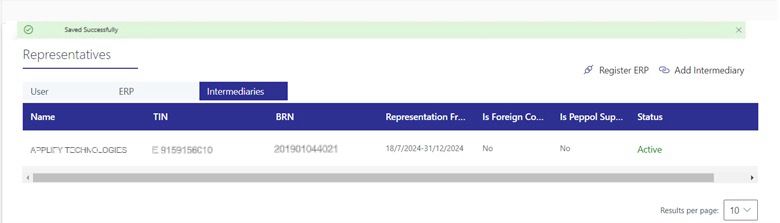
After the intermediary is successfully added, MyInvois should display a confirmation.
Return to the Intermediaries section if you need to review the company, representation period or permissions.
6 Register the ERP System in MyInvois
Return to the Representatives section of the taxpayer profile and select the ERP tab.
Select Register ERP to create an ERP system entry for your MyInvois LHDN e-Invoice integration.
HASiL's MyInvois FAQ confirms that ERP systems can be registered from the Representatives section of the taxpayer profile.
7 Generate the MyInvois API Credentials
On the Add ERP System page, enter the ERP information associated with the integration.
For this configuration, enter Applify Technologies Sdn. Bhd. as the ERP name where applicable.
Identifies the ERP or integration system registered with MyInvois.
Defines the period for which the relevant secret remains valid.
Indicates the principal ERP system where applicable to the integration setup.
Complete the ERP registration and obtain the credentials provided by MyInvois.
Depending on the current MyInvois interface, these credentials can include a Client ID and Client Secret.
8 Connect Your System to the LHDN MyInvois API
Open the company profile or e-Invoice configuration area of the software being integrated.
Enter the taxpayer information required by the platform, which may include your TIN and MSIC Code.
TIN: Tax Identification Number associated with the taxpayer or business.
MSIC Code: Malaysian Standard Industrial Classification code describing the business's economic activity.
Open the LHDN API Connection or equivalent integration setting.
Enter the Client ID and applicable Client Secret generated during the MyInvois ERP registration process.
Save the configuration and verify that the connection succeeds before using the integration for production e-Invoice processing.
How MyInvois LHDN e-Invoice Integration Works
At a high level, a MyInvois API integration allows authorised business software to communicate with MyInvois rather than requiring every relevant action to be performed manually through the portal.
Typical integration flow
- Your business system prepares the e-Invoice information.
- The authorised integration authenticates with the MyInvois environment.
- Data is submitted through the appropriate MyInvois integration process.
- MyInvois processes the request and returns the relevant result or status.
- Your ERP, accounting or invoicing system stores or displays the resulting information for business users.
For developers implementing a direct integration, refer to the MySyncTax developer documentation and the current official MyInvois SDK documentation when planning authentication, document submission and error handling.
MyInvois API Integration Security Checklist
API credentials provide access to integration functionality and should therefore be handled carefully.
- Store Client Secrets securely and outside publicly accessible source code.
- Do not embed confidential credentials in browser-side JavaScript.
- Restrict access to integration credentials to authorised personnel and systems.
- Use HTTPS for communication involving authentication or sensitive business data.
- Review intermediary and representative permissions periodically.
- Update integration settings when credentials expire or are regenerated.
Frequently Asked Questions About MyInvois LHDN e-Invoice Integration
What is MyInvois LHDN e-Invoice integration?
MyInvois LHDN e-Invoice integration connects business software such as an ERP, accounting platform or invoicing system with the MyInvois ecosystem so relevant e-Invoice processes can be handled electronically.
Do I need an ERP system to use MyInvois?
Not necessarily. The MyInvois Portal itself is provided by HASiL and can be used by taxpayers, including businesses that do not have their own system for issuing e-Invoices. System integration becomes relevant when a business wants its software to connect with the MyInvois ecosystem.
What is a MyInvois intermediary?
In MyInvois, an intermediary is an authorised business, company or organisation that can represent a taxpayer for supported MyInvois activities according to the permissions granted by the taxpayer.
Where do I register an ERP in MyInvois?
ERP registration is managed through the Representatives area of the taxpayer profile in the MyInvois Portal. Interface labels can change, so refer to the latest official MyInvois guidance if the layout differs from this tutorial.
What are the Client ID and Client Secret?
They are credentials associated with system authentication and should be treated as confidential. Do not expose Client Secrets publicly or include them in front-end website code.
Where can developers find MyInvois API integration documentation?
Developers using MySyncTax can refer to the MySyncTax API documentation . For MyInvois platform requirements, also review the latest documentation provided by HASiL.
About This MyInvois Integration Guide
This guide is published by MySyncTax to help Malaysian businesses and developers understand the practical steps involved in configuring a MyInvois e-Invoice integration.
The guide should be used together with current official HASiL documentation because MyInvois portal interfaces, API requirements and e-Invoice procedures may be updated.
Official references
Need Help With MyInvois LHDN e-Invoice Integration?
If your business needs to connect an ERP, accounting system or custom application to Malaysia's e-Invoice ecosystem, explore MySyncTax's integration resources and developer documentation.
Contact MySyncTax