
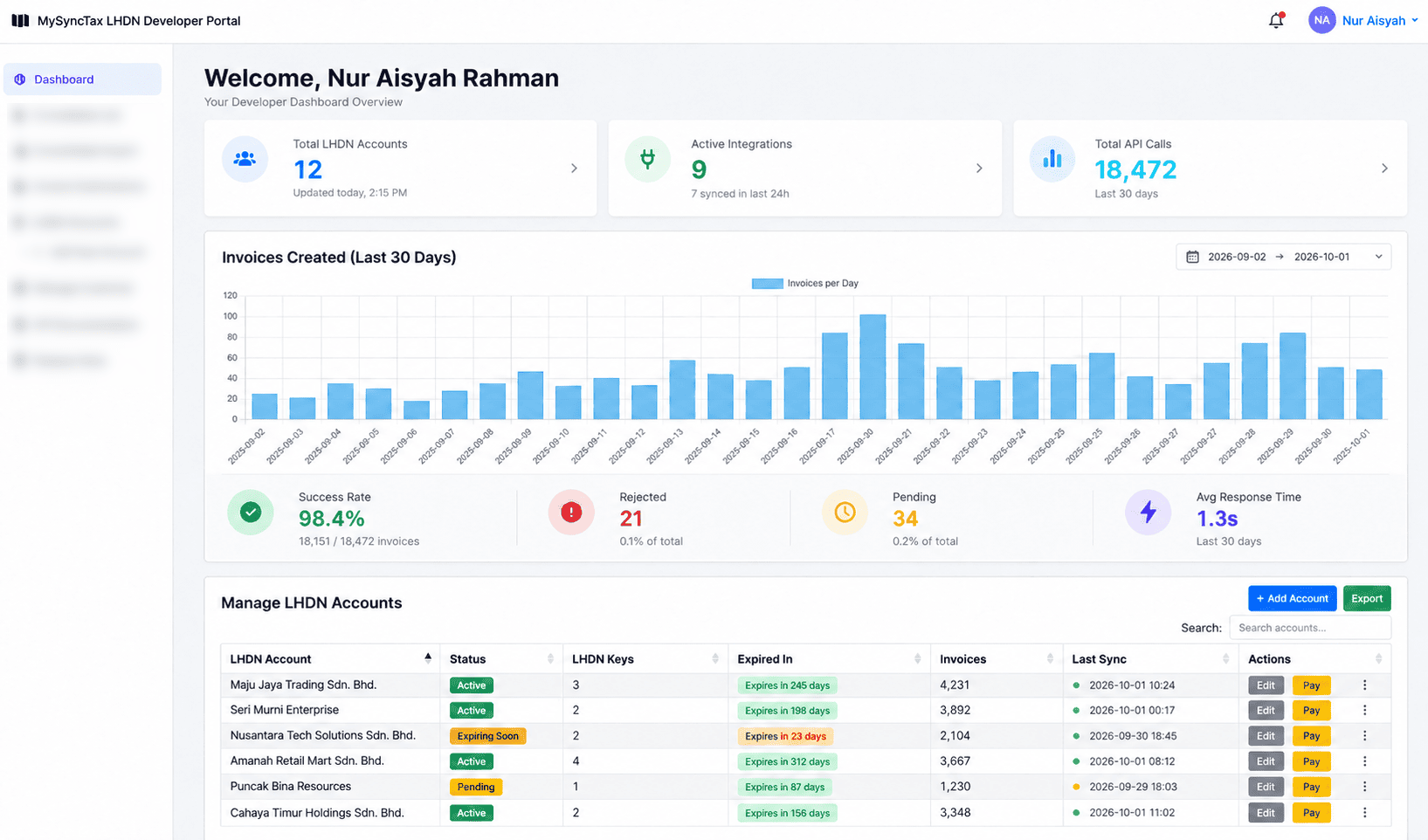
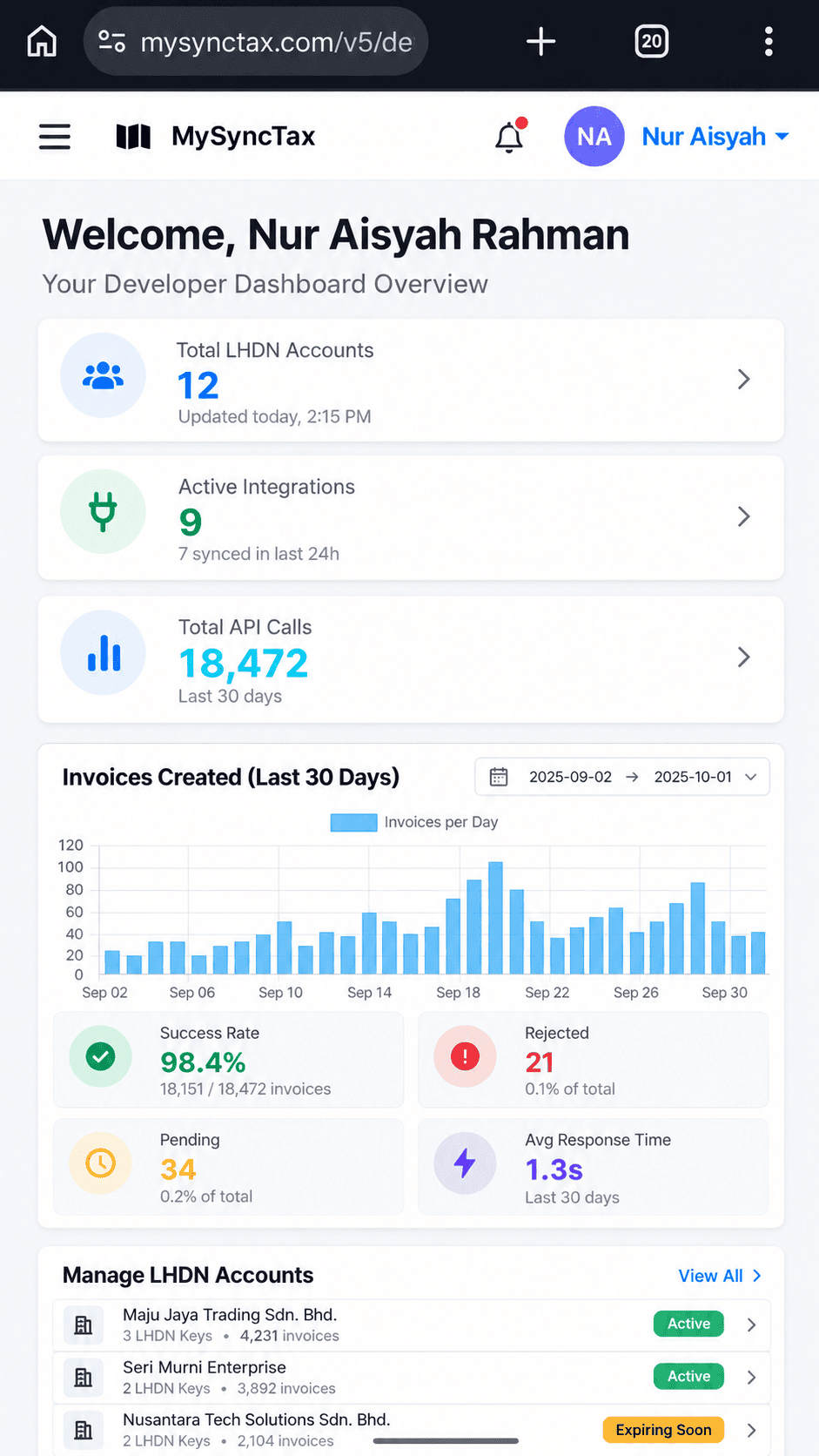
What Is API Integration for MyInvois?
A practical introduction for businesses and developers connecting existing software to Malaysia's official e-Invoice platform.
API Integration for MyInvois connects a business application, such as a point-of-sale (POS), enterprise resource planning (ERP), accounting or e-commerce system, to the e-Invoice services operated by Lembaga Hasil Dalam Negeri Malaysia (LHDN/IRBM). The integration enables software to prepare structured e-Invoice documents, submit them through an authorised API workflow and track the resulting document status.
Businesses can implement the official API directly or work through an integration middleware product. MySyncTax provides a gateway between your existing application and MyInvois, helping development teams organise payload mapping, submission workflows and status monitoring within one integration layer.
Integrating the API does not automatically make every transaction compliant. Your organisation remains responsible for supplying accurate invoice data, meeting applicable LHDN requirements and verifying the final validation result.
Technical reference check: 19 October 2026. This guide references the public LHDN MyInvois SDK and MySyncTax developer documentation. Recheck the latest API specifications before deploying changes.
 01Your POS / ERP / SoftwareInvoice details and business data
 02MySyncTax API GatewayMapping, signing workflow and status handling
 03LHDN MyInvoisDocument submission and validation
Why Choose MySyncTax for MyInvois API Integration?
A dedicated integration layer helps teams connect business software to e-Invoicing without building and maintaining every document exchange process in each application.

Built for Malaysian Software Workflows
Designed around Malaysian POS, ERP, accounting and custom business software, MySyncTax provides documented JSON API requests and separate operations for standard and customer-based invoice workflows.
MyInvois-Focused Integration
Use published API operations for supported invoices and adjustment notes. Review the exact payload fields, credentials and response formats for your chosen endpoint before implementation.
Monitoring and Troubleshooting
Use available dashboard information, returned document references and API errors to investigate failures. Confirm how operational alerts and reconciliation will work in your deployment.
Requirements for MyInvois API Integration in Malaysia
Prepare these details with your development or integration team before testing document submissions.
MyInvois Access and Taxpayer Details
Confirm the taxpayer or intermediary account, relevant permissions, taxpayer identification number (TIN) and the entity that will issue each invoice.
Client ID and Client Secret
Set up the applicable MyInvois system credentials. The official APIs use OAuth 2.0 client credentials to obtain an access token; store secrets securely and reuse tokens until renewal is required.
Required Document Fields
Map seller and buyer information, invoice numbers and dates, line items, tax classifications, monetary totals and other fields required by your document type.
UBL Document and Digital Signature
Prepare the applicable structured JSON or XML document, including the digital signature required for submission under the current official specifications.
Sandbox and Production Setup
Test authentication, payload validation, error responses and status reconciliation in a non-production environment before enabling live invoice submission.
Validation and Error Handling
Plan for pending validation, rejected documents, API throttling, retries and record reconciliation rather than assuming a successful submission response is final approval.
Official technical references: MyInvois authentication, document signatures and recommended integration practices. Requirements can change; use the latest LHDN documentation for implementation decisions.
How MySyncTax Connects Your Software to the MyInvois API
This is the typical integration journey from a source system to LHDN and back to your own operational records.

1Send Invoice Data
Your POS, ERP, accounting or custom application sends the invoice information to the configured MySyncTax REST API using your assigned integration credentials.
2Map and Validate
Invoice values are checked and mapped into the required e-Invoice document structure. Missing or inconsistent data must be corrected before or after submission as appropriate.
3Sign and Submit
The configured signing process prepares the document for submission to the MyInvois service. The submission response may contain identifiers without indicating final validation.
4Check and Reconcile
Match the product response to your invoice record, distinguish the submission UID from each LHDN document UUID, and check the final validation result. Do not treat a successful HTTP response as a validated e-Invoice.
LHDN provides separate endpoints for Submit Documents, Get Submission, and Get Document Details. These are official platform operations; your business system should use the MySyncTax endpoints documented for your integration.
MyInvois API Status Tracking, Duplicate Invoices and Error Handling
An integration is complete only when your source system can account for invoices that are pending, valid, invalid or rejected. Here is what to plan beyond the first API request.
Check the Final e-Invoice Status
On the official MyInvois API, submissionUid identifies a submission accepted for processing, whereas an individual document's uuid identifies a document. Use Get Submission to check processing outcomes; the official SDK recommends approximately 3–5 seconds between status checks.
Keep References Separate
The MySyncTax API may return its own mysynctax_uuid reference and related response fields. Do not assume that this value is the LHDN document uuid or the platform submissionUid. Store the references your specific operation returns and reconcile them with the original invoice number.
Prevent Unintended Resubmissions
Keep the source invoice number and transaction ID consistent. The published MySyncTax reference documents duplicate handling, including HTTP 409 for duplicate submissions in applicable operations. Check the existing transaction first when a timeout occurs; avoid creating a second invoice without confirming the first attempt.
Handle Failed Requests Safely
Review authentication failures (401), validation or payload errors, and duplicate responses using the product's API reference. The official MyInvois APIs can also return 429 for rate limiting. Apply controlled retries and backoff to transient errors, but correct invalid data rather than repeatedly sending the same failed payload.
Official references: LHDN Integration Practices, Get Submission, and Standard Error Response.
MySyncTax Features for MyInvois e-Invoice API Integration
Capabilities designed to support business applications, software vendors and teams responsible for e-Invoice operations.
REST API Integration Gateway
Connect systems capable of sending JSON over HTTPS. Use the MySyncTax developer reference to understand the supported API contract and integration setup.
Payload Mapping and Validation
Support invoice data processing for MyInvois document submissions, including supported invoice, credit-note and debit-note workflows.
Submission Dashboard and Logs
Review available responses and transaction statuses to help trace records through the integration workflow and investigate rejected documents.
Queue and Retry Workflows
Handle temporary service interruptions more systematically. Retry logic must respect API errors, throttling rules and the risk of duplicate submissions.
Token-Based Integration Security
Use HTTPS and configured credentials for application access. Discuss tenant separation, permissions and retention requirements during solution scoping.
Developer Documentation and Support
Refer to the API reference and language-specific integration guides, with assistance available for payload mapping and deployment planning.
Direct MyInvois API Integration vs. Using Middleware
Both approaches use LHDN's published interface. Choose based on your software architecture and the integration work your team can maintain.
Integrate With MyInvois Yourself
Your engineering team builds and maintains authentication, document formatting, digital signatures, submission processing, status checks and exception handling against LHDN's official SDK.
This can be appropriate if your software team has the capacity to support these integrations and future specification changes.
Connect Through MySyncTax
Your application integrates with the MySyncTax API gateway, while the middleware manages the configured mapping and submission workflow. Your team still supplies accurate information and monitors the outcome of each transaction.
This is worth considering when you support several business applications, customer organisations or POS / ERP installations.
MyInvois API Integration Guides for Developers
Build an integration plan around your existing technology stack, test with non-production data and confirm the actual MySyncTax endpoints in the product API reference.
MySyncTax API Reference
Review product-specific authentication, request formats, response fields and supported operations before you write application code.
Explore the API reference →MyInvois API Integration Guide
Follow preparation and integration steps for connecting Malaysian business software to the e-Invoice workflow.
Read the full integration guide →PHP and Laravel Integration
Guides for server-side PHP applications, HTTP requests and Laravel-based ERP or business systems.
C# and VB.NET Integration
Guides for .NET services and business applications that need an e-Invoice API connection.
Example: Send POS Invoice Data to the MySyncTax API
The documented MySyncTax API accepts JSON invoice data using an assigned mysynctax_key and mysynctax_secret. This example shows the format for a standard POS receipt workflow.
POST https://mysynctax.com/v5/public/api/myinvois
{
  "mysynctax_key": "YOUR_MYSYNCTAX_KEY",
  "mysynctax_secret": "YOUR_MYSYNCTAX_SECRET",
  "invoice_no": "INV-2026-001",
  "issue_date": "2026-10-19 14:30:00",
  "sale_id_integrate": 1001,
  "payment_note_term": "CASH",
  "items": [
    {
      "item_id": 1,
      "sorting_id": 1,
      "invoiced_quantity": 1,
      "unit_price": 100.00,
      "item_description": "Example service",
      "price_discount": 0,
      "tax_amount": 0.00
    }
  ]
}
Illustrative POS request: Credentials are placeholders. The JSON demonstrates documented field names, but required fields and operational behaviour depend on the endpoint and configuration. The issue_date format follows the published API documentation. For ERP invoices containing customer details, use the dedicated ERP invoice operation rather than assuming the POS payload covers every scenario.
Example Product Response
The MySyncTax developer reference illustrates a successful response containing a product-generated reference. Actual fields can vary by operation.
{
  "status": "ok",
  "mysynctax_uuid": "generated-unique-id",
  "qr_url": "https://mysynctax.com/v5/public/redirect/EXAMPLE"
}
Important: mysynctax_uuid is not necessarily the LHDN document UUID. Responses that expose official MyInvois identifiers may include submissionUid and document uuid nested in another response object. Do not log or publish live mysynctax_secret values. See status reconciliation and duplicate handling.
🏬Who Uses MySyncTax?
MyInvois API integration is relevant to Malaysian organisations and software vendors that must issue or manage e-Invoices under the applicable LHDN rules.

🧾POS & Retail Systems
F&B, minimarts, pharmacies and retail POS platforms that want e-Invoice without rewriting their whole stack.

🏢ERP & Accounting Platforms
Vendors that want built-in LHDN e-Invoice support for all Malaysian clients through one integration.

🧑💼Tax Agents & Service Providers
Firms managing multiple entities who need a centralized, trackable e-Invoice submission layer.
Our Clients
Organisations featured in the supplied MySyncTax client portfolio. For information about a particular engagement or integration scope, please contact our team.



Official LHDN MyInvois API Documentation and Resources
Use these authoritative references when confirming requirements, API operations and validation rules for your deployment.
MySyncTax is third-party software integration middleware, not the official LHDN portal. For product endpoints and credentials, use the MySyncTax API reference; for document rules, use the latest official LHDN SDK. For related guidance, explore our e-Invoice middleware overview and MyInvois integration tutorial.
Frequently Asked Questions About API Integration for MyInvois
Practical answers for development teams, software vendors and Malaysian organisations planning e-Invoice integration.
What is API Integration for MyInvois?
It is the process of connecting existing business software to LHDN's MyInvois e-Invoice services so that structured invoice documents can be submitted and their validation status tracked programmatically.
Can I connect my POS, ERP or accounting software to MyInvois?
Yes, provided your system can supply the data and support the required integration workflow. MySyncTax offers a REST API gateway for connecting applicable systems, subject to configuration and supported functionality.
Do I need a MyInvois Client ID and Client Secret?
Official direct API integrations normally use system credentials and OAuth 2.0 client credentials. The credentials and authorisations you need when using a middleware product depend on the taxpayer, intermediary and integration arrangement.
Is MySyncTax the official LHDN MyInvois API?
No. MySyncTax is third-party integration middleware. LHDN operates the official MyInvois platform and publishes the technical rules in its official SDK.
Does successful API submission mean an e-Invoice is validated?
Not necessarily. The submission response can acknowledge receipt and provide reference identifiers. Your integration should subsequently check the document's validation outcome before marking it as successfully validated.
What document types can MySyncTax support?
The existing MySyncTax workflow covers invoice, credit note and debit note use cases. Confirm supported document versions and any additional document types with the integration team for your specific configuration.
Can I test MyInvois API integration in a sandbox?
Yes. The official platform provides a non-production testing environment. Confirm the appropriate sandbox configuration, credentials and MySyncTax test access before proceeding to production.
How are rejected or failed e-Invoices handled?
Rejected records should be investigated using error responses and validation details, corrected where necessary, then handled according to the applicable submission rules. Retries must account for rate limits and potential duplicate processing.
What is the difference between submission UID and document UUID?
The LHDN submission UID identifies the batch or submission being processed. A document UUID identifies an individual e-Invoice in that submission. A MySyncTax-specific mysynctax_uuid is a separate product reference, so store each value under the correct field. See status tracking and reconciliation.
How frequently should MyInvois submission status be checked?
LHDN's official Get Submission guidance recommends waiting roughly 3–5 seconds between polls for the same submission and observing the applicable API rate limits. The status-check process in your MySyncTax implementation depends on its supported product operations.
What should I do if an invoice submission is duplicated?
Keep the originating invoice number and transaction ID. Review the original response before retrying; the MySyncTax API reference documents duplicate responses, including HTTP 409 for applicable requests. Avoid resending an invoice whose previous status is still unknown.
Do you provide API integration guides for Laravel, PHP and .NET?
Yes. The MySyncTax documentation menu links to guides for Laravel, PHP, C# and VB.NET.
Can a software vendor integrate several client companies?
MySyncTax is intended for vendors and integrators supporting multiple customers. Confirm tenant configuration, taxpayer authorisations, permitted credentials, data handling and commercial terms before implementation.
📞Discuss Your MyInvois API Integration Project
Tell us which POS, ERP, accounting or e-commerce platform you use, how many entities or outlets need access, and whether you have already configured MyInvois credentials. Share your intended invoice types, expected submission volume and error-handling needs so the team can discuss the applicable API operations.

💬Contact
- Chat via WhatsApp
- Email: support@mysynctax.com
📲What You’ll Receive
- An initial review of your software and e-Invoice data flow.
- Guidance on documentation, testing and integration requirements.
- Discussion of supported vendor or partner arrangements.